Table
The U-Rite organizes and stores data in tabular format - facilitating easy navigation, as well as data input and manipulation. When modelling, this aids the users ability to complete tasks effectively, while enhancing productivity and efficiency. This section provides a comprehensive guide on some powerful features designed specifically towards maximizing your performance when dealing with tables.
Input Value Types
In each table, the user can create and modify entries. Users can enter and link values into a cell or select a user-created profile.
In U-Rite, there are global and property profiles. Global profiles are used at the workbook level, whereas property profiles are exclusive to each property within the workbook. Click Profiles to learn more.
Action Buttons
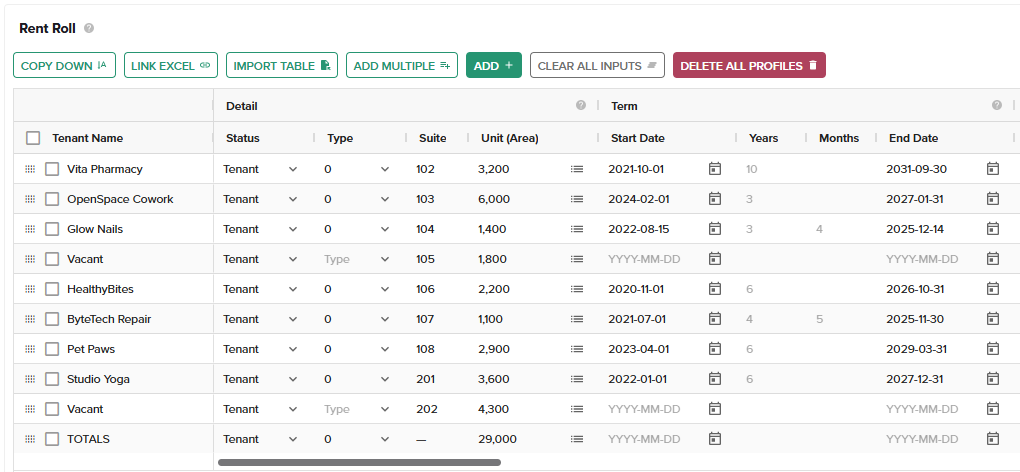
COPY DOWN
Copy down is synonymous with Vertical Fill. Vertical Fill enables the efficient management of spreadsheet information by simplifying the process of applying a single value across multiple vertically-aligned cells; it allows users to quickly replicate a given variable down its respective column. This proves to be instrumental in scenarios which require data consistency between multiple rows. This also leads to increased productivity, reducing tediousness when handling large datasets.
Usage
Select the desired range and either click COPY DOWN button or press Ctrld
Ensure the value-cell is positioned at the top.
COPY ACROSS
Copy across is synonymous with Horizontal Fill. Horizontal Fill provides an easy way for users to populate one cell's content across multiple horizontally-aligned cells within any given row - proving particularly useful when dealing with 2D value tables requiring uniformity across rows.
Usage
Select the desired range and either click COPY ACROSS button or press Ctrlr
The value you want to apply across the selection must be placed at the most left.
LINK EXCEL
Linking in the U-Rite app is a powerful feature that allows you to connect different pieces of information together across worksheets and workbooks. This capability can significantly enhance your data management and analysis by ensuring consistency and accuracy of data.
Usage
Select a cell or range and click LINK EXCEL button or press Ctrl=
IMPORT TABLE
The Import Table feature empowers users to seamlessly extract tabular data into the U-Rite. This functionality streamlines the process of working with various data sets within U-Rite.
Click Import Table to learn more.
ADD MULTIPLE
User can add multiple entries at once. Enter the number of entries you would like to add.
ADD
User can add an entry by clicking this button.
CLEAR ALL INPUTS
Clicking this button will reset all the values inside the table to their default values.
DELETE ALL PROFILES
Clicking this button will reset the table to it's default empty state.